01
Measured transmit rate
An active probe exercises the radio on each channel instead of estimating performance from indirect indicators.
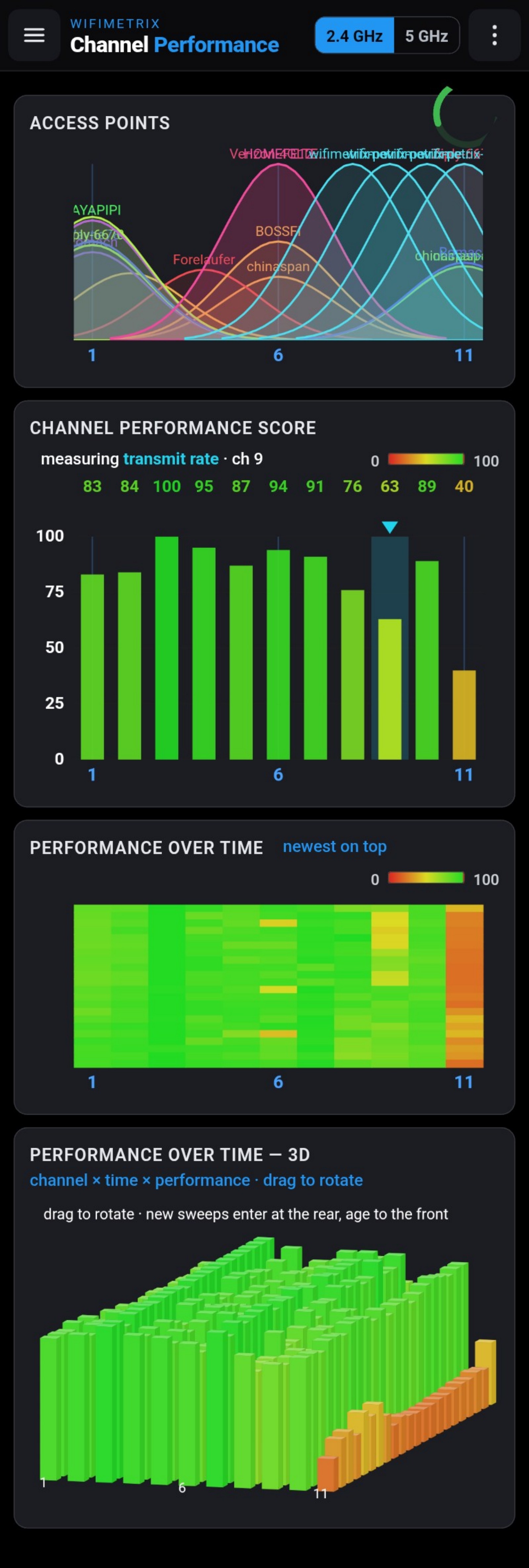
Channel Performance actively measures how fast the appliance radio can transmit on each Wi-Fi channel, then ranks the results so the strongest choice is immediately visible.
Spectrum activity and network discovery are valuable evidence, but neither directly measures how effectively an 802.11 radio can use a channel. A channel that looks clean may still perform poorly; a busy-looking channel may remain surprisingly usable.
Channel Performance runs an active over-the-air transmit test and uses the achieved rate as the evidence. The fastest channel in a band scores 100, the rest are scaled against it, and the underlying Mbps measurement remains visible.
EXPLORE THE RELATED DESKTOP PRODUCT ↗The score makes the recommendation easy to read, while the raw rate and history keep the result technically meaningful.
An active probe exercises the radio on each channel instead of estimating performance from indirect indicators.
Color and height create an immediate visual ranking, with the best measured channel called out.
Heatmap and historical views expose channels whose apparent advantage disappears as conditions change.
Evaluate the channels relevant to the network or deployment under test.
The appliance visits each channel and performs the active measurement.
Use the normalized score for ranking and Mbps to understand the absolute difference.
Confirm that the preferred channel remains strong across repeated sweeps.
A single snapshot ranks the band; the historical views show whether that ranking is durable.
Channel Performance replaces intuition with a direct measurement from the same class of radio the network must serve.